|
||||||||
|
||||||||
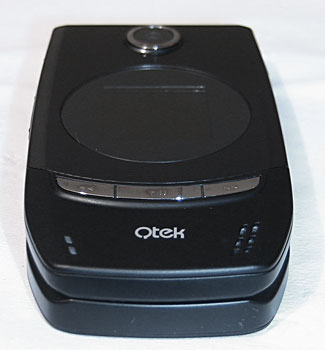
Also on the front is the 1.3MP camera and a pair of very bright and slightly annoying LED’s to show Bluetooth and network status. I really don’t need these. I know the Bluetooth is on: I turned it on… and why would I need to know if I’m in network range or not… What exactly could I do with that information? Call people to let them know I’m out of range? Manufacturers note: don’t need flashing lights, thanks.
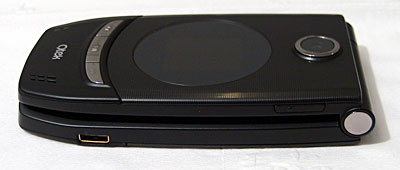
The battery compartment on the back is a tight fitting slice of aluminum that covers the battery, the SIM and the MicroSD slot. The good news is that the MicroSD is not under the battery, the bad is that it’s now under the SIM; arrgh! On the sides are buttons for volume up/down, function and camera. In use the phone is, frankly great (read on before you rush out to buy though!), it is a joy to use, the keyboard has a great tactile feedback, the five-way button pad is quick and error free in use; it’s very similar to the RAZR in that respect. Smartphone 5 OS equals great usability; all the usual toys are present and almost everything is customizable. I’m rushing through the description I’m sorry but you have to read the next bit…
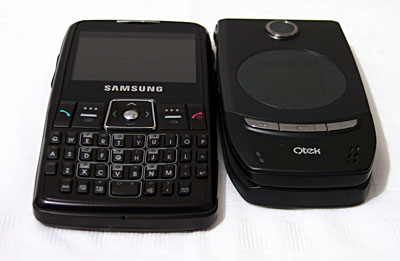
Size comparison: Samsung i320 and the QTEK 8500 Phone Features and Reception This is the bit where I describe how this phone is simply the candy-bar version folded in two, how it’s reception is great and how happy I am… and of review… sadly no. It’s a disaster. Somewhere in the factory, when they split the phone in to two and put in the hinge, something went wrong; very wrong. The QTEK 8500 is plagued with a reception problem that renders it next to useless. This problem had prevented me from reviewing the unit; I have to say, and this is very un-journalistic that I didn’t want to put out a bad review of what I had hoped to be my favorite phone. The nature of the problem starts when you go out of signal; the phone should re-acquire a signal quickly and silently; in short, it doesn’t. Instead the phone loses the signal and never recovers. Many have reported ignoring the phone for hours only to find that a reboot is the only recourse and that there voice mailbox is full of angry callers. My experiences only backed this up. Is the problem software or hardware? I’m concluding that ‘s a little of both. Here’s how I found out. I first looked for a firmware upgrade from QTEK but that’s nowhere in sight however, users report that the i-mate Smartflip which is the same device and was released later doesn’t suffer the problem. So the trick would be to run the Smartflip software on the QTEK right? It’s a bit trickier than that. Some background for regular folk: Mobile phones are really complex devices, they’re closer to your home PC than to that old cordless phone you have at home, they have processers and memory as well as storage for the programs they run. In the past they were simpler and the memory used to store the programs was very expensive and could only by written to once so the manufacturers had to get the software absolutely right first time otherwise they would be in for an expensive re-call. Today, the storage is cheap and can be erased and re-written thousands of times. Marketing pressure means that phones often get released with known bugs just to get them out before the competition; I think that this happened here; not enough testing before release. It’s so easy to load the software from one PDA or Phone onto another that software piracy has started to be a problem for operators; for example, let’s say that operator ‘T’ offers a cheap candy-bar phone with basic features for basic money. Along comes operator ‘C’ that releases the same hardware from the same company but loads it up with lots of document viewers and tools that they must pay for. There’s nothing to stop smart users downloading the software from the expensive unit and putting it on the cheap one. Well, until now. HTC the manufacturer introduced a lock buried in the firmware to prevent this and the people on the Internet that can unlock this for you charge a small fee, which I had to pay. Oh, you weren’t thinking that this was a show-stopper did you :-) I loaded up the i-mate software, which is bad I admit, but in my defense I would have used the QTEK update… if it were available! I will of course apply the QTEK when it arrives. The i-mate software includes revised radio software. The result was immediate; the phone holds a signal better and restores the connection after loss. No more missed calls. Well, not many. It’s still not right. If it had arrived like this I would have described it as ‘poor’. On my commute home I can usually hold a reasonable signal all the way but time after time the QTEK with orginal ROM loses the connection. Where the QTEK candy-bar version was solid, the flip is flakey. Oh dear. Horsepower and Performance It’s a carbon copy of the candy-bar version, The CPU is a 195MHz Texas Instruments OMAP 850 as reported by the system status utility. It’s ARM compatibly and spritely in operation. In use it’s great, responsive and satisfying. It’s more than powerful enough to play audio, video and as a GPS navigator running CoPilot 6 for Smartphone; very quick indeed. Memory is 64MB RAM and 64MB FLASH RAM. At rest there is 17MB of RAM available, 7MB Flash ROM. With email, web, camera, contacts, Windows Media, Call History and file manager running, available RAM is still 16Mb. The recently released Cingular 3125 version keeps the 64 megs of RAM but updates flash ROM to 128 megs, which means even more storage. Nice. Expansion slots MicroSD is now the way to go; these things are actually bigger than SD cards… no really, let me explain. If you’ve seen one you’ll know that they are tiny; they’re the size of a small finger-nail. There’s no way that you can put one in your pocket without it disappearing into the fluff that trouser manufacturers build in there… so, you have to carry them in the plastic box they come in… hence they’re bigger than SD! In the phone they’re tiny and with a 1Gb max (today) that’s half an average iPod, not bad for a phone and plenty for pictures, email etcetera. Display, Gaming and Multimedia The keyboard it very positive and the five-way pad reliable in operation – good for gaming. The display is gorgeous; I really think that there’s nothing to improve; its bright, has great contrast, high resolution and thanks to efficient LED lighting returns 4+ hours playing MPEG4 movies from the MicroSD… that, is a better result than most dedicated portable media players! Sound quality is good, plenty of dynamic range and good clarity. The supplied phones are ok I suppose but I recommend an upgrade for great audio. The Bluetooth stack supports audio over Bluetooth (A2DP) so break out those wireless headphones for best mobile effect. If you get dual mono from your Bluetooth stereo headphones, you may need to edit the registry to enable stereo: go to the key HKLM\SOFTWARE\Microsoft\Bluetooth\A2DP\Settings and change the UseJointStereo value from 1 to 0. The integrated Windows Media Player is great supporting DRM’d music and automatic synchronization to your PC. But for Video, the free TCPMP still edges out WMP for performance, easily managing 30fps on MPEG4 video.
Bluetooth Bluetooth support is very much improved in WM5 and now works with a much broader range of devices. Bluetooth audio is there and pairing with all my test devices was a snap. Using DUN (dialup networking) and the 8500 as a wireless modem over Bluetooth, EDGE speeds with my laptop were good and the connection easy to set up. Battery Life The flip feature sacrificed a little battery life; down to 750mAh from 900mAh in the candy-bar. Run-time 3-days which is enough for me. The claimed 5 hours talk time with 100-150 standby seems a stretch. It’s up from before which makes me wonder if they’ve changed the radio electronics sacrificing function for battery life. The Cingular 3125 packs a larger standard battery, so runtimes are even better. Software The Smartphone is a phone first then a PDA so the list is shorter than Pocket PC. There’s no Word/Excel/PowerPoint but there is Email, Calendar, Contacts and Tasks plus Windows Media Player, Internet Explorer and Pocket MSN. QTEK and i-mate add the HTC applications for Camera and Video Camera though the output is viewed on Microsoft’s integrated Pictures and Videos app. System tools include an HTC File Manager but no Registry Editor. i-mate also adds document viewer suite too. ActiveSync is the Microsoft application used to link the phone to the desktop. Physically it’s a USB connection. From the software you can browse your phone as a disk device and set up and configure synchronization. Sync. of email, tasks, favorites, calendar and contacts can be completed with the included Outlook Client or your installed Microsoft Office. Email, Calendar, Contacts and tasks can be synchronized with a Microsoft Exchange server over the air. You can’t underestimate the value of synchronization, especially over-the-air; it’s great to get a new contact number, type it into your PC then, call it on your phone. Read emails on your phone, reply and forward; great stuff. The version of Active-Sync that ships with Windows Media 5 devices is now 4.1. Third-party software for the Microsoft Smartphone abounds and there are version optimized for the new OS features. It’s unlikely that an investment in Microsoft Smartphone would leave you wanting for any application. The platform includes a JAVA virtual machine with a dedicated download manager. Conclusion I’ve dragged this out as long as I could in the hope that there would be a resolution to the radio problem. This is a great phone; performance, design, feel; it’s all top notch but what if you want to use it as a phone; if so it’s a sub-par device with weak reception. All-in-all I have to move on, pass over, leave behind… well, until the reception fix is released. Or go for the i-mate Smartflip instead. One last word; Cingular in the US has released their version (Sept. 13, 2006) and big carriers don’t usually make big mistakes so I eagerly await their version of this otherwise excellent Smartphone. Pro: A really good, well constructed, well thought out, connected phone. Con: Radio reception is sub-par on the QTEK version. Web sites: www.america.htc.com, www.clubimate.com
| ||||||||

 (i-mate Smartflip and