|
||||||||
|
||||||||
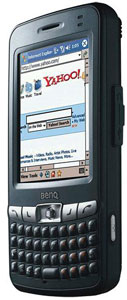
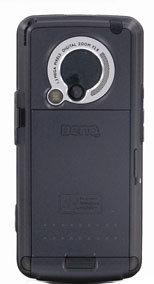
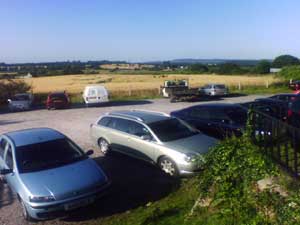
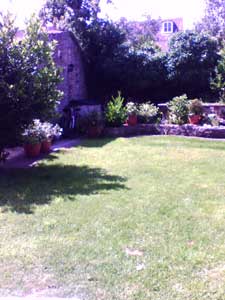
Horsepower and performance The P50 is powered by a 416mhz Intel Xscale processor coupled with 64mb of both RAM and ROM. This is a middle-ranged processor for a Pocket PC and on the fast side for a Pocket PC phone, and can manage most everyday tasks. It feels faster than an iPaq h2210, taking less time to open the start menu etcetera. Playing videos encoded at up to about 600kbps works well, as does playing games if it weren't for the tiny joystick. You can set the CPU speed to one of three settings: Automatic which scales the CPU depending on how much it is being used, power saving mode which scales it backwards to save power, normal mode which doesn't scale anything, and optimization mode which scales it up at the expense of battery life. A small flaw is that after installing a few applications, the camera app cannot find enough resources to apply effects etc, and sometimes even not enough to take a picture in the first place. I recommend installing any apps to ROM. The 64mb RAM is a little disappointing for such an expensive device, but the 12mb ROM and SD slot still offer some storage space. Multimedia and Display The BenQ is a smaller PDA, and so has the smaller 2.8" screen. It's still full 240 x 320 though, which makes the whole PDA longer. So you'll still be able to use all your QVGA apps, it will just be a little smaller. The screen has a strong backlight which can illuminate a small room in darkness, and has eleven levels of brightness. Comparing to an ipaq h2210, the backlight is much brighter. Video playback works well on the device, although the smaller screen can be annoying. To test the movie playback, I ran an episode of the Simpsons through it using TCPMP, and these were the results: TCPMP Version 0.71 Benchmark Results Average Speed 358.00% Bench. Time 6:51.076 Original Time 24:31.649 Included on the BenQ is Windows Media Player 10, which is now included on all WM5 devices. MP3-ing also works very well, with jumps and stutters only when the screen orientation is changed. You can set the phone to pause the music when a phone call comes in, and start the music again afterwards. This is very convenient if you're using the headset whilst the PDA is in your pocket. Games do work on the device quite well, thanks to it's 416mhz CPU and 64mb RAM, but the small joystick makes it almost impossible to use any games that require it. Keyboard The keyboard sits underneath the screen, like on the Palm Treo series and the HP iPAQ Mobile Messengers. The keys are 4x5mm in size, and look like miniature Nokia 7600s. There are 39 of them, and they are bumped for easier typing. The keyboard is easy to use, but as soon as you start to speed-type (well, as much as you can on a 6cm keyboard) you start to misspell a lot. My advice is to slow down and pace yourself, for the first few hundred words anyway. After that, you start to learn the feel of the keys and where they are. The keys have great tactile feedback, and offer a nice "Click!" when pressed. There are 12 numpad keys covering UIO, JKL, and NM! which can be used to input digits from 1-9 and * and #. Dialing a phone number from any application is easy— just hit Call Send and dial the number. The Keyboard also has a backlight, but I have noticed that it hums loudly. This will not be a problem unless you are talking on the phone whilst the backlight is on, but its certainly easy to notice. Phone Features The BenQ P50 is a GSM Mobile phone as well as a PDA, and so can receive/send calls, text messages, and access the internet via GPRS. The radio is quad band, supporting 850/900/1800/1900MHz bands. This means it will work anywhere in the world GSM service is available. Reception is okay. I live in a particularly bad area for anything other than O2 in the UK, and I can get five bars on that network. In contrast, my Sony Ericsson T630 could only get 3-4 bars. The phone has the Windows Mobile standard on-screen dialer; you can pull it up by pressing the Call Send button at any time. Alternately, you can dial numbers using the number pad on the keyboard, as described above. You can hold the call send button during a call to start loudspeaker, which works well up to about two feet away. BenQ included a nice little app called Photo Caller ID, which displays a photo of the caller when that person calls. You can take the pictures on the P50 using the camera, or just point to the file from the app. They also included a program called Set Ringtone which lets you set mp3, kar, mxmf, mmf, and wav files as the phone's ringtone. Both of these apps help a lot in everyday use. Camera On the back edge of the phone is what looks like a large camera lens; its not. The actual camera is the smaller lens to the bottom of that. The camera has a 1.3 megapixel CMOS sensor and the lens sits in between the flash (a small LED light) and the speaker. It supports resolutions of 176x144, 320x240, 640x480, and 1280x960, and has a 3x digital zoom. You can manually set the white balance, brightness, contrast, and apply effects. It has enough settings and options for most newbie photographers, but don't expect super photos. There is also a camcorder function, and its okay quality at 320x240. You would not want to record a feature-length movie on this camcorder. You can record for however long your SD card will hold. The actual camera quality is average, with minimal noise and okay white balance. Since a picture tells a thousand words, here are some samples which have been resized but are otherwise unedited.
Wireless and Networking One of this PDA-phone's main features is its triple wireless. It integrates a phone with WiFi and Bluetooth, so you are connected almost all of the time. WiFi is the standard 802.11b adapter, made by BenQ. You can select one of two Power Saving modes: Normal Power Saving and Super Power Saving. Since the PDA's CPU is the bottleneck for web browsing and file downloads, power saving is a good idea unless you're at an access points far limits. Bluetooth is the generic Microsoft stack, which is, to say the least, disappointing. It lacks easy connecting, which can be tough on non-tech-savvy people, and doesn't have many options. The supported profiles are Headset, Serial Port, OBEX/Object Push, and Dial Up Networking (DUN). Alas, for those in the US, the phone has GPRS but not EDGE, so you'll be limited to GPRS' slower speeds when using the Internet via your carrier's data connection. Software The P50 has been in development since 2004, and so was originally designed to Windows Mobile PC 2003. It was released before Windows Mobile 5.0, and so far there hasn't been an update, so I'm afraid we're stuck with Pocket PC 2003SE. But that doesn't mean the PDA isn't useable; we lived with the OS for nearly three years. One-handed usability is restricted with the older operating system, with the stylus being needed for anything other than simple tasks. The BenQ has all the standard Pocket PC 2003SE built-in applications like Pocket Word and Pocket Internet Explorer, and several others than BenQ added. Pocket Studio is integrated with the camera, and has some very good editing capabilities too. Photo Caller ID lets you assign contacts with picture IDs, so when you receive a call that person's photo is displayed. Set Ring Tone does exactly that, it lets you set all kinds of audio files (including mp3s) as the phone's ringtone. Universal Remocon is a Consumer IR program which acts as a remote control for almost anything, SIM Manager can copy contacts from your SIM card, Speech Commander is a voice recognition app that works surprisingly well, and Java MIDlet Manager is a VM for J2ME applets. On the included CDs are Sprite Backup, Skype for Pocket PC, PowerPoint Viewer trial, and a PDF Document Viewer. Battery Life The P50's battery lives on the back of the device, and is quite large. Its a 1240mAh Lithium-Ion battery, which is middle of the road for a PDA Phone. You can charge it via the charger port on the bottom, or, if you have a powered USB port, through the mini-USB sync connector on the side. It takes eight hours to charge up the battery first time, and then about two hours after that, which isn't bad. Battery life isn't bad on the device; an hour of web browsing over WiFi dropped the battery by 32%, and I also ran a few songs on a loop for an hour with the screen and wireless turned off, and the battery went down by 14%. Talk time over GPRS is around two hours, which is much less than the claimed 4 hours. Most people should be okay with this, but if you're a heavy WiFi or GPRS user then you may want to consider an extra battery. Conclusion The BenQ-Siemens P50 has had a hard time, being late for the market and outstripped by the sooner-released Treo 650 and HTC Blue Angel, but it still manages to deliver a good set of features in a small package. It has a nice case which, from a distance, looks like a large mobile phone, but also has some annoying flaws. If BenQ had kept the P50 in developement for just a little longer and worked out the problems, they would have a killer. Pros: Small size, triple wireless, integrated keyboard, built-in camera is okay, good performance, battery life is great. Cons: Buttons can accidentally be pressed easily, runs the outdated Windows Mobile 2003SE operating system, only 64mb RAM. If the battery runs dry, the phone will lose your data. No EDGE (or 3G) for data, only GPRS.
| ||||||||