|
||||||||||||||
|
||||||||||||||
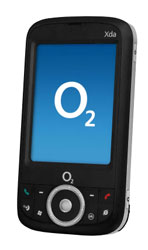
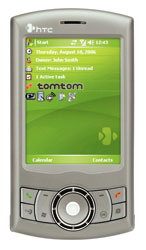
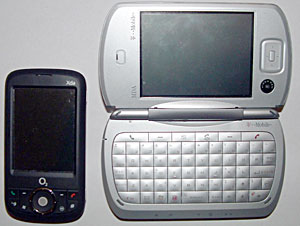
HTC RollR One of the most interesting aspects of the HTC Artemis models is that they have the new HTC RollR navigation device. This is a combination of a scroll wheel, like the Samsung i300’s, and a rollerball, like the BlackBerry Pearl’s. The rollerball is easy to move with your finger or thumb, and can be set to either scroll in 4 ways like an ordinary directional pad, or move a cursor around the screen, like a desktop computer. When in “Mouse Mode”, as HTC calls it, pressing the ball inwards triggers a tap where the cursor was. Pressing and holding triggers a tap-and-hold. I found myself clicking the cursor over a scroll bar using the ball, then rolling the ball downwards to scroll down; this does not work. It takes a bit of getting used to clicking on the little arrows again, but after a few hours you’ll get the hang of it. When in D-pad mode, pressing the ball inward acts like the center button on a normal D-pad. In my opinion, using the rollerball in this way is not great, I had to concentrate on not moving the ball too far and overshooting the item I wished to select. The scroll wheel around the outside of the ball is much more suited to scrolling than the ball itself. The quality of the RollR is overall quite good. The rollerball works well in Mouse Mode, and is good for one-handed navigation, but the D-pad mode isn’t as good for scrolling. This is countered by the scroll wheel, which is a nice touch that makes it possible to scroll etc, whilst in Mouse Mode. Horsepower The HTC and XDA are both powered by a TI OMAP850 processor running at 201Mhz. This is a low clock speed compared to other PDAs, but frankly unless you’re going to pile applications into the device and play graphics-intensive games, you probably won’t feel the difference to a 312Mhz or maybe even 416Mhz XScale. Both PDA’s have 64mb of RAM, and 128mb of RAM, and a Micro-SD slot to expand your storage space. Playing videos on the phone works reasonably well, but don’t expect your 1200kbps high-quality videos to play well at all. Using the Office Mobile apps and PIM aren’t bad; checking my emails and scrolling a list of over a hundred contacts left me with an impression of speediness. I experienced no lagging or slow-downs. For such a slow clock speed, this PDA doesn’t do badly at all. Screen and Multimedia Being a compact device, the Orbit and P3300 have 2.8” screens. There was once a time when this would be considered small, but with the recent onslaught of smaller phones and equally small screens, it seems that 3.5” screens are a thing of the past for phones. That said, the screen on the XDA is beautiful. It’s sharp, vibrant, and is a pleasure to use. The screen’s resolution is 240 x 320, and supports 65 thousand colours; these figures have become very common in PDAs.
Music on the device is hampered by the lack of a normal headphones jack. Instead of a 2.5mm or 3.5mm socket, you must use the mini-USB socket recently favored by HTC and the included headset to listen to music. That aside, Windows Media 10 is included, as always. An FM radio is built into the device, but you can only use it when the included mini-USB headset is plugged in (it includes an aerial). Phone Features Of course, the Orbit and P3300 are also mobile phones, too. They have a quad-band phone radio, with GPRS and EDGE. Reception is good; I could get 4 bars of signal on the device, whereas on my Sony Ericsson T630 I could only get 2-3 bars typically. Unfortunately, there are no 3G capabilities. However, you still have EDGE, so you won’t have to face 56k GPRS speeds when out of reach of WiFi. GPS The XDA and P3300 both have internal SiRFstarIII GPS receivers, and come with software. However, the XDA comes with CoPilot 6 software pre-installed, and the P3300 comes with TomTom. Only the premium model of the P3300 comes with TomTom and full maps, and the map bundle varies by selling region, the most common being Europe. The P3300 "Taster" comes with TomTom pre-installed, 1 voice and 1 free city map download. The GPS is decent, in the way that it isn’t better than a dedicated GPS (of course). Owing to the mediocre clock speed of the processor, the GPS is sometimes a little slow. This isn’t usually a problem, but when going fast on the motorway, it sometimes tells you to turn off at the junction you’ve just passed a second ago. However, most of the time, the GPS works well, but don’t expect it to replace a dedicated GPS.
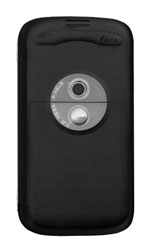
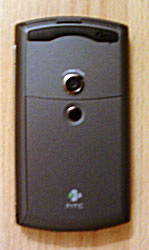
Software The XDA and HTC differ in software, as well as case design. They both run Windows Mobile 5.0, but O2 has put their own add-ons on the XDA Orbit. Included is a task manager, which appears on both the today screen and by tapping and holding on the close button, O2 Operator Settings application (to automatically enter connection settings to connect to O2’s network), and various Today Screen plugins. Included on both devices is an FM Radio application, which controls the FM radio. It can store radio station frequencies, and also lists currently available stations in order of strength. This is useful, as it allows you to choose a radio station based on how strong the signal is. As per normal, you’ll find Word Mobile, Excel Mobile, and PowerPoint Mobile, as well as the usual Calculator, Internet Explorer Mobile, Terminal Services client, Pocket MSN, File Explorer, Bubble Breaker, Solitaire, Pictures and Videos, Outlook Mobile, Calendar, Tasks, Contacts, Phone, and Notes on the device. Wireless and Networking The XDA Orbit and HTC P3300 both have WiFi and Bluetooth, as well. Unfortunately, still no Bluetooth 2.0, and we still have the Microsoft software stack. WiFi is good on the device, with strong signal and 802.11G support. Battery life using WiFi wasn’t bad either, more on this below. Battery Life This is where the device shines. The battery powering all of this is a 1200mAh Lithium-ion battery, which isn’t bad for a Pocket PC this size. Browsing the internet through WiFi for half an hour with the phone turned on in the background took down the battery by 20%, turning on Bluetooth reduced this by 4%. Listening to MP3’s through the included headset using Windows Media Player 10 for an hour took about 15% out of the battery. This is very good battery life, unless you have WiFi and Bluetooth on and are using the phone solidly all day, you’ll most probably get through the day easily. Conclusion This really is the age of convergence, and the O2 XDA Orbit and HTC P3300 strive to replace all of your gadgets with one device. Although the awkwardly placed Micro-SD slot and lack of a normal headphones jack are an annoyance, that is all they are, an annoyance. In contrast, the phone is small and light, it is reasonably fast, has triple wireless, FM radio, great screen and a GPS receiver. Pros: Good screen, WiFi, Bluetooth, EDGE, HTC RollR that works well, better camera than previous HTC iterations, FM radio, fast performance for a 200Mhz processor, integrated GPS. Cons: Mini-USB headphones jack rather than standard 2.5mm jack, MicroSD card is underneath the battery.
Web sites: www.O2.co.uk, www.htc.com Price: ~ £199 or less for XDA Orbit from O2 with contract. $600US for HTC P3300 from importers and specialty shops unlocked for use with any carrier
| ||||||||||||||