|
||||||||||||||
|
||||||||||||||
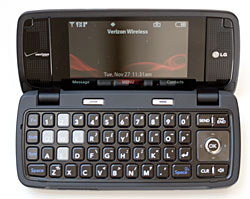
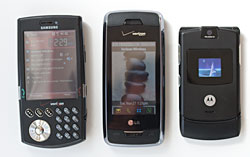
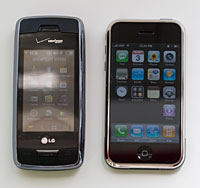
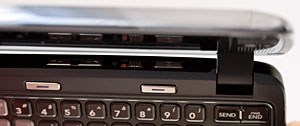
Above: the LG Voyager and the iPhone. Keyboard and Design When the flip is open, the external display shuts off and the internal one takes over with no delay. The keyboard is nearly identical to the enV's and is extremely usable. The keys have decent travel with a tactile click, and a tone sounds each time you press a key (you can adjust the key press volume and disable it too). There's a dedicated number row, a 4-way d-pad with center action on the right side of the keyboard and two soft keys just below the display. Our only complaint is the strange spacebar location (one on each end of the bottom row rather than a single spacebar in the center), the right spacebar's overloading with the voice command key (hold it down a little longer than normal and you'll get the voice command prompt... we'd like a longer delay before this triggers) and the volume keys that are partially blocked when the flip is open (this was a problem on the enV as well).
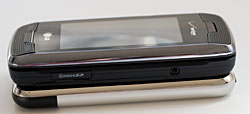
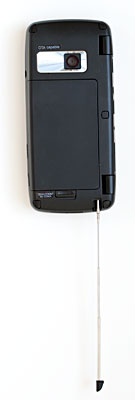
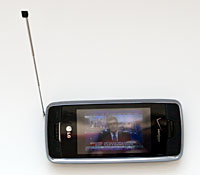
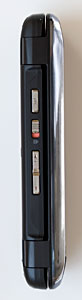
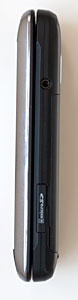
Those are the volume keys, keyguard lock and camera button hiding in the crevice between the two halves of the clamshell. The front cover has only call send and end buttons and a clear key that does double-duty as the voice command key (we'd like to press the key longer before activating voice command). The SDHC microSD card slot that's compatible with cards up to 8 gigs capacity lives on the phone's right side along with the 2.5mm headset jack. The volume rocker, keyguard slider and camera button are on the left side. The Mobile TV telescoping antenna is on the bottom as is the charger port that doubles as a USB port (cable included). The phone uses the same $30 Music Essentials kit as the LG enV which includes a wired stereo headset, software CD with Music Manager and USB driver and a USB cable for syncing music. Phone, Data and GPS A phone can slice and dice, wash your car and play Pavarotti but it still must be good at one thing to pass our most important test (and likely yours): it has to be good at making calls. The Voyager had excellent voice quality in our tests and volume is quite loud. Even with only one bar, calls were clearer than most other Verizon phone's we've recently reviewed. The speakerphone isn't deafening but it is clear and free of distortion. If you start a call with the flip closed then open it, the Voyager automatically turns on speakerphone if no headset is in use. Close the flip and the call transfers to the front display and speakerphone turns off (it does not end the call). Calls through a wired headset and Bluetooth headsets likewise sounded loud and clear (we tested the phone with the Plantronics Discovery 655 and the Jawbone). The Voyager is a dual band digital CDMA phone that operates on the 800/1900Mhz bands with EVDO rev.0 for high speed data and 1xRTT for fallback when not in an EVDO coverage area. Data speeds using the phone's HTML web browser were very good and the browser does a decent job of rendering regular HTML web sites. It's light years ahead of the usual Mobile Web browser and had no problems rendering our site, CNN and other popular sites. While not exactly a true desktop experience, nor as good as the iPhone, casual web surfers and heavy web users will likely make do unless support for dHTML, advanced JavaScript and multiple window support are needed. Email support is less impressive with the usual non-smartphone Verizon choices: use the web browser for web-based email or Verizon's mobile email client. If you need serious email features, get a smartphone instead.
The phone does support Bluetooth DUN for those who wish to use the phone as a wireless modem for a notebook. It doesn't come with any syncing software. If you wish to sync to Outlook, Verizon's $20 Wireless Sync is the solution (it also handles email) for Windows users (sorry Mac users!). There are 3rd party freeware apps like BitPim which will no doubt support the Voyager soon. For those in need of direction, the Voyager has a GPS that works with Verizon's $9.99/month VZ Navigator service. The phone found us quickly and provided clear and accurate directions to a variety of destinations in the Dallas metroplex. Navigator can map addresses in your contacts, intersections, airports and to saved favorites. It also has a POI database and can send your GPS location to a friend's phone via SMS. Camera Call clarity is paramount, with the camera and entertainment generally taking 2nd and 3rd place in importance. The LG's camera looks good from the specs: 2 megapixel with autofocus lens (an autofocus lens generally greatly improves image sharpness). But the photos themselves didn't impress us: outdoor shots had an overly cool color bias and indoor shots were as grainy as a 1.3MP fixed focus camera phone's images. Usually indoor images taken under incandescent light are overly warm but often the Voyager took cool indoor shots too. The photo of the kitty below was among 3 taken, 2 of which were cool and the one below had accurate to slightly warm tones. The pool shot looks almost surreal thanks to the color cast.
The phone can take photos up to 1600 x 1200 resolution along with lesser resolutions suitable for photo caller ID and MMS. To launch the camera app, give the side camera button a short press. You'll see a message telling you to hold the phone horizontally to take photos (we tried holding the phone vertically and it still worked fine), then the entire outer screen becomes the viewfinder. There are options for self-timer, shutter sound (including off), spot metering though there is no flash. The Voyager can shoot video at QVGA 320 x 240 maximum resolution at 15fps with mono audio as well as 176 x 144. You can set the camera to save images and videos to internal memory or a microSD card. Like all Verizon feature phones, the LG can send images and video via MMS. V Cast Video and Mobile TV The Voyager has a few high end multimedia tricks, in case the large touch screen, stereo audio and camera weren't enough. Sure, there's V Cast Video for streaming on-demand video clips and Verizon's music store where you can buy tunes directly on the phone. But even more interesting, the Voyager joins the Samsung u620, LG VX9400 and Motorola Z6tv to offer broadcast digital TV using Qualcomm's MediaFLO technology. This is broadcast over-the-air programming and not streaming digital content served over EVDO. Extend that telescoping TV antenna, pay approximately $10/month additional on your cell phone bill (on top of the $15/month V Cast service) and you've got 8 TV channels to watch: NBC, CBS, ESPN, MTV, Nickelodeon, Comedy Central, NBC News2Go and FOX. The video is large and lovely on the Voyager's excellent 262,000 color external display and with the antenna fully extended we got very good reception, making for the best V Cast Mobile TV experience yet. Yes, there are commercials and some programming is time shifted (and repeated so you get more than 1 chance to catch a show).
For those not in a Mobile TV coverage area, there's Verizon's standby V Cast video service which offers a wide variety of clips (many are free). While we prefer AT&T's Cellular Video programming selections, V Cast TV is suitable entertainment for the commute or to catch up on sports and news. Since this is streaming video over EVDO, compression and occasional hiccups and data buffering make for a less perfect picture than Mobile TV, but the Voyager's large display improves the experience. Battery Life Like the enV VX9900, the Voyager has a 950 mAh Lithium Ion battery that lives under the back cover. Battery life is similar to the enV and other recent high-end Verizon features phones. If you use the phone lightly (30 min./day on the phone, browse the web for 30 minutes/day, watch TV for 30 minutes/day and listen to music for 1 hour/day) it should last 2-3 days on a charge. If you're into V Cast videos, runtimes will be shorter (EVDO and video playback are hard on the battery). Claimed talk time is 4 hours which was on target in our tests (assuming you use the phone for little else). Conclusion We liked the LG VX9800 and enV, but the Voyager takes that line up several notches in the multimedia and innovation departments. The large external touch display works well, though not perfectly for touch control and at 400 x 240 pixels and 262k colors, it's Verizon's best phone for watching V Cast Video and Mobile TV. We can't say that the Voyager really competes with the iPhone-- the iPhone is unique when it comes to features and user interface, and the LG offers a keyboard and the usual set of cell phone features the iPhone misses (sending MMS for one). If you're considering both Verizon and AT&T and have a hankering for both phones, we heartily suggest you visit a store and play with them first to get a sense of how different they really are. The Voyager has one of the best cell phone keyboards on the market, a compelling multimedia presentation with great music playback quality (we'd still like to see a more feature-rich player), very good Mobile TV and V Cast. Those who wish to watch full YouTube are out of luck-- you'll need to stick with YouTube mobile (m.youtube.com) and the video player doesn't support lots of formats for home-burned video. Call quality is excellent and reception good, and we find it easy to recommend the Voyager. Pro: Great outer and inner displays. Outer touch screen with vibe is innovative and fairly functional. Fantastic QWERTY keyboard, excellent sound quality, very good call quality and A2DP stereo Bluetooth support. Verizon's UI is simple and easy to learn, though some common tasks require too many taps or clicks of of the d-pad. For those in need of direction, VZ Navigator works well on the phone for turn-by-turn directions. Con: Large and heavy compared to feature phones. Touch screen response sometimes lags and vibration isn't as helpful as you might think. Camera is just so-so.
Web sites: www.verizonwireless.com, www.lge.com Price: $349 with 2 year contract (currently $299 when purchased online from Verizon's web site).
| ||||||||||||||