|
||||||||
|
||||||||
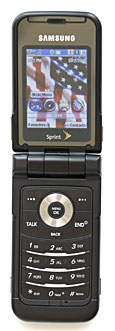
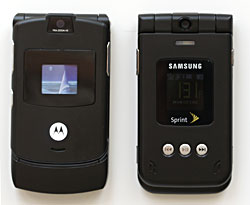
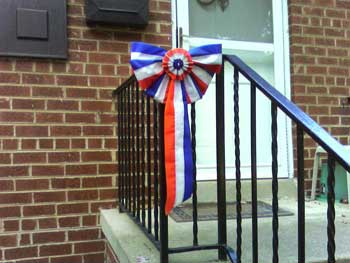
The A900M uses and Samsung thoughtfully includes a stereo 2.5mm headset connection that includes a microphone. The sound won’t win any awards, but it does provide stereo. The microphone works very well, providing easily understood conversation to the other end. Better stereo headsets may be had from third parties. A USB adapter cable also ships with the phone. Recall that the Motorola includes no cables or headsets with the RAZR, even though it needs a special USB headset. Phone Features and Reception We received a Sprint-branded A900M that supported 800 and 1900 MHz CDMA networks, as well as Sprint’s Power Vision EVDO high-speed network. This setup enables roaming on non-Sprint CDMA networks, which worked seamlessly on a competitor network in the Metro tunnels under Washington, DC. The big ‘R’ beside the signal strength icon makes it clear that you are roaming. The A900M also has a built-in GPS locator which the user may disable except for emergency calls. Voice calls were all clear and trouble free. I used Sprint for six years until recently, and rarely had problems with their network. The phone recognizes when a headset plugs in and changes the volume settings accordingly. Overall operation proved very smooth. I took the phone on the road with me to Atlanta. It connected to the local Sprint network immediately upon powering on. When I checked the weather, asking the software to change my location, the OS asked me if I wanted to use my current GPS location—nice touch. Without typing in a new city or zip code, I received the local weather at the Atlanta airport. Slick! I found the EVDO network speed enhancement to be very nice as well as very consistent. Compared to GPRS, it flies. I downloaded several large (>1MB) files to test the speed, which took about a minute per megabyte. That seems like a dream next to GPRS’ ~25 KB/sec on a really good day, mostly much less. Videos and music downloaded quickly and without issue. Themes seemed to be the largest files for which size could be determined, so their downloads provided the benchmark. Text pages like news and sports appeared within a second or so. Horsepower and Performance Overall speed of execution on the Samsung was very quick. Whether traversing the menus or loading the Java subsystem for applications, the phone responded crisply to user requests. This was one of the most responsive phones that I’ve used. The Samsung A900M uses Java for add-on software. Java apps load rather slowly on the RAZR, but comes up in a second or two on the A900M. Applications all ran quickly as well. Combined with the EVDO network, the net result was a very nice data machine that is ready when you are. Display, Gaming and Multimedia The A900M display proved nothing short of stunning. The main screen measures 1.78” x 1.53” and sports 262K colors over 240 x 320 pixels. The fonts may be a bit small for older eyes, but they are crisp and distinct with excellent contrast. It literally looks like a tiny computer screen and I found it easy on the eyes. The top line of the display hosts a plethora of informative icons. It has icons for the phone signal, ringer type, GPS location setting, data network status, messages, battery life, and probably some things that I never saw. Thankfully, Samsung provides a helpful on-phone list of icons that runs several screen pages, though most of the icons will be familiar to most mobile phone users. The external screen comes in at 0.76” x 0.76”, 65K colors, with 96 x 96 pixels. It hosts many of the same icons as the inside screen as well as the date and time. As with the internal display, this one is bright and easily readable with the backlight on. Although the screens are both beautiful with backlight, they are not reflective. So, when the backlight goes out the screens are essentially blank. Many other phones have reflective outside displays so that you can read them in bright light without running the backlight. The external time display in particular shows up well on the RAZR. Pressing one of the side buttons lights up the external display on the A900M for viewing. Videos, music, and Sprint TV all work through the Media Player. The media player works quite well and possesses the usual convenient controls. With 47 MB of available memory, there’s plenty of room for whatever you wish to toss into the A900M. Music played smoothly on the A900M, but the included headset didn’t do the system justice. The Samsung saves play lists and organizes your music nicely. Of course, the music isn’t free, but must be purchased from Sprint Music Store which as a moderate selection of songs from a variety of artists and genres. It uses AAC+ coding for music on the phone and WMA with a copy for your desktop. The AAC+ version will not play on the desktop. Songs of “average” length weighed in at about 600K each. Streaming content was well-buffered and played without interruption or “skipping”. Video quality is great, but they are formatted very small. The media player doesn’t play videos full screen, but in a significantly smaller format. Although visually attractive, movies, TV shows, news, and sports clips really aren’t all that useful when postage stamp sized. Full screen videos would improve the viewing significantly. Download times measured in seconds, providing a good user experience in that regard. Camera The A900M has a nice 1.3 megapixel camera in its top hinge with lots of flexibility in its controls. It has a flash, self-timer, color tone adjustment, brightness and white balance settings, resolution (1280x960, 800x600, 640x480, 240x320), quality, and shutter sound selections. That’s a lot of flexibility in a phone camera! Pictures come compressed as JPEGs, with full resolution/high-quality occupying between 300 – 500 KB per picture depending on content. This picture was taken outside at maximum quality:
From a bit closer up with different colors:
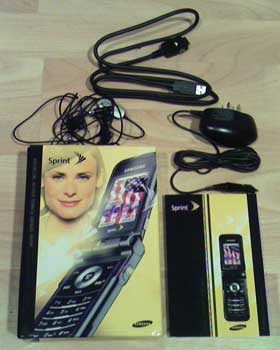
This one was taken indoors and shows what comes in the A900M’s box except for the phone itself (which took the picture, silly.)
Overall picture quality is pretty good, but there’s no zoom option. The camera will also capture video with sound. The camera can be rotated within the hinge to protect the lens—very nice. Bluetooth The Class 2 Bluetooth radio has the standard range of 10 meters (~30 feet). Discoverability may be controlled, and I recommend setting it as discoverable to no more than 3 minutes at a time to avoid over-the-air virus attacks. The A900M paired effortlessly to the Logitech Mobile Freedom Bluetooth headset that uses BT 1.2. I also paired it with a Dell Axim X50v without effort. Other protocols supported include hands-free, dial-up networking, basic printing profile, object push profile (OBEX), and file transfer protocol (FTP). Surprisingly, you apparently cannot transfer pictures, music, or videos through the Bluetooth file system from their native directories on the phone. The built-in file manager will find all the files, but there’s no option to send them anywhere from the file manager, or even move them around the phone's memory. Battery Life The 850 mAh lithium-ion battery takes up most of the back of the device. This seems like a large capacity for a phone and you’d think that it would last forever. However, the awesome screen, high-speed data connections, and seemingly fast processor consume that power like a termite colony eats a lumber yard. Samsung advertises three hours of digital talk time. My usage indicated that you may get to two-and-a-half hours if talk is all you do. But then if all you do is talk, this highly capable phone will be wasted on you. My practical experience showed about half that time is more likely, maybe two hours at most depending on heavily you hit the data pipe. If you use the Power Vision data features regularly, chances are that you won’t make it all the way through a medium-usage day without recharging. That problem carries over from the original A900, which also suffered from poor battery life. Software The Samsung comes with a plethora of attractive and useful programs. We already discussed the media player. It also comes with a nice browser, a photo album, address book, messaging, content management, and file browser. The Sprint premium content access proved both simple and safe. Preparatory screens always appear before purchase decisions and the purchase/download button isn’t the default button. That’s a nice touch. One thing that I noticed: Most TV shows, all music, and most downloadable applications as well as the usual ring tones and themes don’t come free. Software not included that you don’t need: USB storage device setup program. Under Windows XP, just plug the phone into your USB port, tell the A900M to connect to the desktop, wait a few seconds for Windows to recognize it as a USB storage device, then the phone comes up as a disk drive. You can access the entirety of the phones mass storage memory, including pictures, videos, music, etc., and then back them up to your PC. Great approach by Samsung. On Demand is an interesting collection of programs that provide fast access to a host of content, including news, weather, sports, entertainment, games, etc. In the initial setup, users can set their location across all the On Demand software. The NFL Football scores and standings are accurate soon after games, as are the updated standings. I used this set of software more than any other to obtain current content during testing. I found the instant information addictive. Software and operating system updates may be downloaded over the air via a menu entry. During the testing, one update came available: “Medium priority: Update to correct the PCS Mail URL found in Menu/Messaging/IIM and Email/PCS Mail.” The update program estimated eight minutes for the update process. The actual time was only two minutes and then the phone rebooted itself. Samsung made the whole process simple, quick, and reliable. Messaging proved pretty standard. You can send text, pictures, and videos to other phones or to email accounts. The T9 predictive text scheme works well. Sending and receiving messages worked flawlessly. Again, the high-speed EVDO network makes light work of the data transfer. Not all the software features shone. Call History provided the most recent numbers called with the time and date, but not the call length. Neither does it track the airtime or data cumulative totals to help the user stay within their monthly allotment. This is one of the nicest features in the RAZR’s software. In addition, the system can only be minimally customized. Themes and ring tones may be changed across the system, but menus and buttons are pretty much set. Only the Favorite menu can be customized by the user. This will probably suit the average user, though. I highly recommend moving the Bluetooth setup to the Favorites menu to save endless drilling through menus. Conclusion The Samsung A900M will do everything but your monthly payroll mailings. As long as you have Sprint Power Vision network connectivity, the world’s current information will be available in your hand. Not only will you have the latest buzz, but it will be presented briskly on an outstanding screen. This has to be the most impressive mobile phone that I’ve ever encountered. If you use or switch to a CDMA network, can afford to subscribe to the content and applications you desire, and don’t stray far from an AC power source, then the A900M is tough to beat for power and pizzazz. Pros: Cons: List Price: $99 with 2 year contract, $349 without contract Web site: www.sprint.com, www.samsung.com
| ||||||||