|
||||||||||
|
||||||||||
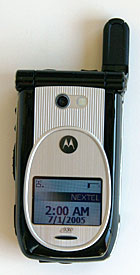
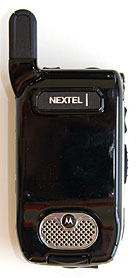
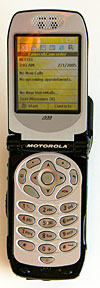
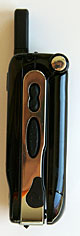
The PTT buttons are up top: the left button controls the PTT external speakers, and on the right it brings up a list of phone numbers. You can scroll through the list of phone numbers using the rocker on the phone's left side, and press the left PTT button to initiate a call to the selected number. This, of course, would only work for those numbers with PTT capabilities. Open the flip and you're greeted with a nice, bright 65,000 color screen. In the keypad area you'll find the usual Home key, two soft-keys, back key and an OK button in the center of the direction pad. I have an average sized hand, and I find it difficult to push the buttons, especially Home, back and the two soft-keys, as they're too narrow though long. The call and hang up buttons are also small, but the number keys are usable. As with most Sprint/Nextel devices, the i930 has an extendable external antenna. While I had the phone, I never needed to extend the antenna, as coverage was very good, and the reception decent. Horsepower and Performance The i930 runs on a 200 MHz Texas Instruments OMAP 730 processor which is competitive with other MS Smartphones currently on the market. The phone has 64 megs of flash ROM with 27 megs available for storage, and 22mb of available RAM at boot with no additional programs running. For expansion the unit has an SD slot that supports SD and MMC cards. Windows Mobile features WM2003SE comes with standard features such as Messaging, Contacts, Calendar, Pocket Internet Explorer and ActiveSync to synchronize with Outlook on Windows PCs. I had no problems syncing the Smartphone with Microsoft Outlook, which is a blessing considering that my Windows Mobile 5 Sprint PPC 6700 usually crashes the computer. WM2003SE runs very well on the i930 without any of the issues that MPx220 suffered, nor does it have any problems multitasking. I used the Messaging feature extensively and I had great luck with it. Messaging I have used the MPx220 to retrieve my e-mails, and run a variety of other applications as well. My MPx220 has a lot of bugs, from freezing to crashes, but the i930 proved to be very stable. Data on Nextel's iDEN network is usable with tolerable page loads in Internet Explorer on the phone. It took 40 minutes to download 956 e-mails (15,741k): not quick, but usable. Battery The i930 does not have good battery life, perhaps due to the relatively middling capacity 880 mAh Lithium Ion battery. I had the phone fully charged, and after downloading the 956 e-mails, the phone was completely drained. It was certainly a surprise, as I did not have the screen on most of the time. Keep your charger nearby if you're a heavy email user! I then tested the phone with retrieving messages every 15 minutes. Again, the battery life was short as it didn't even last a day. I did the same thing with my Motorola RAZR, and the RAZR got more than a day on a charge. Reception Reception should be the biggest consideration for anyone purchasing a phone. No matter how cool the device is or how cheap the service, the phone must be able to make calls where you need it to. In comparison to my Sprint PPC-6700, the i930 did pretty well. In comparison to the Nextel i870, reception was about the same. I find that Nextel's coverage is usually better than Sprint's and that's the reason why it performed better than my PPC-6700. Nextel's stability beat Cingular's reception in my area (Cingular coverage varies greatly depending on where I am in town), as tested with my Treo 650. Of course, carriers' coverage varies depending on where you are, so always try to evaluate a carrier's service in your location. The i930 also supports the 900 and 1800 MHz GSM bands used outside the US which means you can use the phone when traveling anywhere in the world outside the US where GSM is available. Why won't it work in the US for GSM? Because the US uses the 850 and 1900 MHz bands instead. PTT and Call Quality The i930's PTT feature works well. I could easily turn the PTT speakers on and off and thus limit the disruptions. The external speakerphone for the PTT and calls is loud and picks up my voice well, even in the car. The i930 supports private and groups calls, though it doesn't have Direct Talk and Enhanced Group Talk, two new Nextel features. The i930's incoming and outgoing voice quality is excellent as is call volume. Call quality is consistent with no dropped calls. The i930's speakerphone is loud and clear! Camera The Motorola's VGA camera won't wow you now that 1 megapixel cameras are the standard for high end phones. That said, it takes pretty good photos with pleasing colors and decent contrast. The CMOS camera's application allows you to take photos in one of four quality settings at 640 x 480 resolution or smaller sizes if you wish. You can save photos to an SD card or internal memory, set it as your wallpaper or send it via MMS or IR. In addition the camera can shoot video with audio up to 10 seconds in length. Conclusion If you're a Nextel customer and hunger for an MS Smartphone, the i930 is currently your one and only choice. It's heavy and chunky and runs an older version of the Windows Mobile OS. That said, Motorola's implementation of the WM2003SE on this device is very good. The device is stable, and I've not had any lockups with the phone. The Smartphone also multitasks very well, and the CPU is peppy, running the tasks that I throw to it quickly. Voice quality and volume are very good and PTT works well. It may be your only choice, but it's not a bad one. And the 900/1800 MHz GSM support is very attractive to world travelers. Pro: Works overseas on GSM networks. Stable, has Push to Talk, excellent call quality and volume, full sized SD slot rather than MiniSD. Loud speakerphone. Con: Older operating system, heavy and chunky design, no Bluetooth, uninspiring battery life. Price: $349 with contract Web Site: www.sprint.com (Sprint bought Nextel)
| ||||||||||