|
||||||||||||||||||
|
||||||||||||||||||
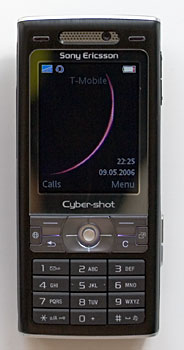
Phone Features and Reception As mentioned before, the Sony Ericsson W800i operates on the 900/1800/1900MHz GSM bands. In the US, T-Mobile users can take full advantage of the 1900MHz as T-Mobile operates mostly on that band. Please note that you can not take advantage of the 3G UMTS fast data network supported by the K800i on 2100MHz since they are no 2100MHz networks in the US. If you travel to Europe where 2100MHz UMTS is deployed you can get fast data speeds with the K800i. As a back up data connection, the K800i offers the good ole GPRS and the connection speed on T-Mobile is about 35k/s. The K800i gets very strong signal with a T-Mobile SIM in both North Dallas area and downtown Los Angeles, both areas are known to have excellent T-Mobile coverage. The voice quality is good on both incoming and outgoing ends. The volume isn’t the highest we have heard, but it’s loud enough for most environments. The Sony Ericsson offers some popular phone features such as call forwarding, call waiting, 2 voice lines and conference calling. You can assign speed dials from number 1-9 on the number pad and since it’s an international phone, you can also assign default languages either by the SIM settings or from a list of languages. If you are lucky enough to be in an UMTS coverage area, you can make video calls with the K800i. But make sure both you and the call recipients are in the UMTS coverage areas with subscription. The Sony Ericsson also offers voice dialing feature via voice tags. You will need to pre-record your voice commands and contact names to use voice dialing. Make sure that you record the tags in a quiet environment for the best results. When Sony Ericsson came out with the K800i, they really had Europe in mind for fast data via UMTS while the K790i and K790a offer EDGE for fast data. So the downside of this decision is that you will have only GPRS speed for this EU 3G phone in the US. At least you get the very capable NetFront browser to enhance the surfing experience. While the browser can’t complete with the Nokia S60 3rd Edition’s outstanding browser, it does offer full HTML browsing and can display most of the web sites we threw at it. While the connection speed is abysmal in dslreports speed test, the web page download speed isn’t too bad and the phone can download most mid to heavyweight web pages. The browser also supports landscape viewing and options to clear cookies, cache and passwords. You can also go to a link on a web page or highlight a phone number on a web page to dial it. The K800i has a list of major phone carrier settings and you can choose one from the list to set up the data connection for your carrier.
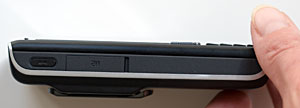
The phone supports SMS, MMS and email. Before you can send MMS messages you must set up a MMS profile. The Sony Ericsson K800i has 4 pre-installed MMS profiles including E-Plus, T-Mobile, Vodafone and O2 MMS. If you are not on any of these networks, go to www.sonyericsson.com/support and go through the a short process to get the settings sent to your phone. The email client supports POP/IMAP4 and P-IMAP (standard push email). The K800i has an intuitive walkthrough to help you set up email accounts. One additional app in the Messaging group is the RSS reader that even supports images in feeds. It works in the similar way to the Nokia S60 series RSS reader and updates feeds quite fast. You can enter a new feed manually, or if you are on a web site that offers RSS feed you can just go to the menu to save the feed to your RSS list (he browser will grab the RSS URLs for you). You can also schedule the RSS reader to automatically update all your feeds every hour, twice a day, once a day or once a week. RSS junkies will love this application! The Sony Ericsson K800i feels speedy in most applications and tasks even when it’s running several applications and games. Video play, 3D gaming, email download and other demand apps feel pretty zippy. Thanks to the slow data speed in the US, the only thing that’s slow is when you download large web pages (800k-over 1MB per page). The K800i comes with 64MB internal memory which is good enough for installing some additional applications, storing some tunes and a few photos and videos. But if you need more memory, you can take advantage of the Memory Stick Micro (M2) slot. The tiny Memory Stick Micro, developed by Sony and SanDisk, is about one quarter the size of Memory Stick PRO Duo and is compatible with Memory Stick PRO card readers with an adapter. Since the Sony Ericsson supports multi-tasking, you will run into occasional run-out-memory moments. If the phone feels sluggish or gives you a message that says “can’t go any further”, just reboot the phone.
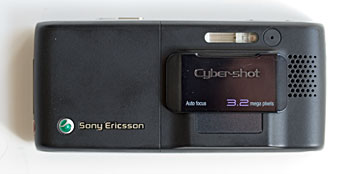
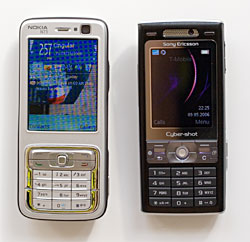
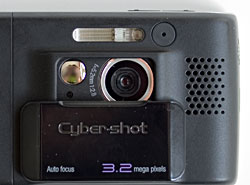
To take a photo, simply slide open the lens cover to launch the camera application. Conversely, closing the lens cover exits the camera application. You’ll hold the camera in landscape orientation with the zoom buttons on the upper left edge and the shutter button on the upper right edge. To engage autofocus, press the shutter button half way down and you’ll here a beep when the lens has focused. The BestPic option takes a series of 9 shots (think of it as bracketing) and you can select which one you feel is best and save it. This option isn’t available when the flash is in use. The camera has several scene settings: Auto, Twilight landscape, Twilight portrait, Landscape, Portrait, Beach/Snow, Sports and Document. Auto does the job very well in most cases. The K800i can take photos at 4 resolutions: 2048 x 1536, 1632 x 1224, 1280 x 960 and VGA. It has auto, macro and infinity focus settings, flash control including red eye, an image stabilizer, a self timer, white balance, metering mode (whole frame or spot), several effects and two quality settings. That’s plenty enough to make you feel like you’re using a “real” camera. You can print photos over USB to PictBridge printers, or insert the memory card into a PictBridge printer to print photos directly from the card. The camera can take video with and without audio (you decide), and video quality isn't nearly as impressive as still shot quality. The Nokia N73 has the edge here as does the video-centric Nokia N93. Sample Photos taken at highest resolution and quality, unedited other than resizing to fit this page. Click on a photo to see a larger image.
Bluetooth The Sony Ericsson K800i has integrated Bluetooth 2.0 with support for some popular profiles such as Hands-free, Headset, Dial Up Networking (DUN), OBEX, Synchronization and even A2DP profile for transmit high-quality stereo audio to Bluetooth stereo headphones. We tested the K800i with a few Bluetooth headsets and the Plantronics Pulsar 590A stereo Bluetooth headphones. The Sony Ericsson sounded slightly muffled when using with the Cardo scala 700 which performed well with the Sony Ericsson W300i. You will notice some digital breakup noise as well via the headset. The volume via the Bluetooth headsets is loud enough for most cases and the range is very good on the scala 700, reaching at least 20 feet. Playing music through the Plantronics Pulsar stereo headphones is a joy with the K800i thanks to the A2DP support. The sound quality does decrease a bit (more muffled), but the bass has more boom and the large earpads on the Pulsar blocks out more noise which produces a more immersive music listening experience. The range between the K800i and the Pulsar also reached at least 20 feet which is very good. If you have the data plan that lets you use mobile phones as modem, you can use the K800i DUN connection to turn the phone into a wireless modem. Though with slow GPRS speeds don’t expect to have a stellar download speeds. File transferring between the phone and the desktop via Bluetooth is also a useful feature. The transfer speed is good enough for text files and photos, while music files take a bit long: a 12MB file takes about 3 minutes to transfer from the desktop to the phone. Keeping Bluetooth radio turned on and working with Bluetooth headsets on the K800i don’t drain battery as fast as they do on the W300i. Battery Life The Sony Ericsson W800i comes with a standard Li-Polymer battery (BST-33 model) that’s 950mAh in capacity which is a bit larger than the battery found in the Sony Ericsson W810i and the W300i. The claimed talk time is 7 hours on GSM and 2.5 hours on UMTS. In our tests the talk time seems a bit more optimistic but not by much on a GSM network. We don’t 2100MHz UMTS networks here in the US to test. The claimed standby time is 14 days, which seems close to reality if you don’t use the phone. None of the major tasks you’ll perform such as playing music, taking photos, syncing, accessing PIM information and even keep the Bluetooth radio on effect battery life grossly. Software In addition to the web, messaging, multimedia and gaming apps, the Sony Ericsson K800i also comes with a suite of PIM applications including Contacts, Calendar, Tasks, Notes and more. You can store contacts in both the phone’s internal memory and on the SIM card. Each contact entry can have 5 numbers, 2 street addresses and multiple email accounts as well as a web address, birthday and notes for additional info. The Calendar, Notes and Tasks applications along with several other utility apps live in the Organizer folder. Calendar has monthly view, weekly view and appointment view. You can sync the data from the Contacts, Calendar and your notes and tasks to your desktop via PC Suite using the included USB cable. You can also sync via Bluetooth or IR, but USB 2.0 syncing is the speediest. In addition to the PIM apps, you will also get a File Manager application. For synchronizing to your desktop, you can download PC Suite from sonyericsson.com/support. PC Suite is a one-stop app that will sync your PIM data, process photos, rip CDs to your phone and more. It’s a Windows-only application. Conclusion Though not designed for the US market, the Sony Ericsson K800i is a viable solution in your world phone arsenal. If you travel overseas and you have T-Mobile service in the US, then this is a great phone with strong reception and an excellent digital camera. The photo quality competes head-to-head with other current autofocus 3.2MP camera phones and works well for voice. Now that the Sony Ericsson K790a has been released, it is the better choice for US users; T-Mobile users will gain EDGE data speeds and Cingular users must have the K790a’s 850MHz band. Pro: Great camera! Lovely screen and reasonably compact given the features inside. The multitasking, 64MB memory and Bluetooth 2.0 with A2DP support put the K800i in the top tier of the feature phone pack. Nice browser, though not the best one, and a good RSS reader. Con: We wish that the number keys were a big larger. The phone really need more RAM to run multiple applications. The lack of the 850 band and EDGE makes it a bad choice for Cingular users but a fine choice for those in Europe and Asia as well as T-Mobile US users who don't care about data speeds.
Web site: www.sonyericsson.com, www.dynamism.com List Price: ~ $449 unlocked for use with any GSM carrier
| ||||||||||||||||||