|
||||||||||||||||||||
|
||||||||||||||||||||
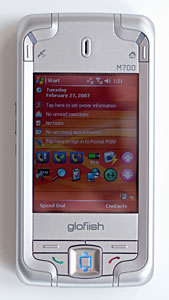
On the front you'll find GPS and Home Menu quick launch buttons above the display, with the earpiece centered between them. The M700 has standard Windows Mobile softkeys below the display and call send and end buttons that flank a square d-pad with center action button. Unfortunately, there are no dedicated OK or Windows Start Menu keys on the front face (these would speed up one-handed operation).
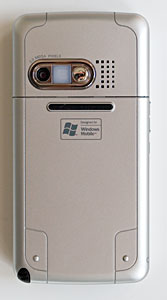
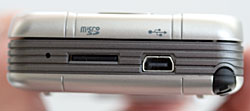
Volume up and down buttons as well as the voice command button and a stereo 2.5mm headset jack live on the device's left side and the camera and power buttons are on the right side. As with the X500, we found ourselves constantly accidentally activating voice command since the button is easy to press and is right where you grasp the device to pick it up. The stylus slot is at the bottom right hand corner and the MicroSD card slot and USB sync/charge port are on the bottom as well. The camera lens, flash and self portrait mirror are on the PDA's back, with the speakerphone grill just to their right. The battery lives under a large plastic door on the back that's more easily removed if you pull the stylus out first, and the SIM lives under the battery. There's a battery release latch that you'll need to slide down before removing the battery. A rubber ridge runs across the back of the phone which makes for more gentle landings on hard surfaces. In the Box E-TEN includes the M700, a stylus, Lithium Ion battery, world charger (same mini USB connector, amperage and voltage as recent HTC phones), USB sync cable (the Glofiish supports USB charging), a black horizontal leather case with belt clip, software CD with ActiveSync and Outlook 2002, printed guide and a stereo earbud headset with inline mic. Phone Features, Data and Reception The Glofiish M700 is an unlocked GSM quad band phone that will work with any GSM carrier. It supports the 850/900/1800/1900Mhz bands, which are all the bands used in the world, and it has EDGE (but no 3G for data). Reception is good on the 1900MHz and 850MHz bands used in the US and we tested the Glofiish with both T-Mobile and Cingular SIM cards. Though RF isn't as strong as the T-Mobile Dash (an RF champ), it's better than average. Incoming voice quality using the built-in earpiece is good though not fantastic (the Treo 750 gets that honor) and volume is good as well, and similar to the HTC TyTN / Cingular 8525. Outgoing voice using the integrated mic is average with decent volume but some call recipients commented that we were definitely not landline clear. The bundled headset works well for calls and doubles as stereo headphones for multimedia playback. Download speeds are good by EDGE standards and the M700 averaged 152k on DSL Reports mobile speed test. Mobile versions of Internet Explorer and Outlook are included on the device and they're a standard on all Windows Mobile phones and PDAs. Since the Glofiish runs Windows Mobile 5 with AKU 3.2 it supports MS Direct Push email for use with Microsoft Exchange Server 2003 SP2 or newer. The M700 offers the same useful phone software found on prior E-TEN Pocket PC phones and the Glofiish X500. The Phone settings applet allows you to switch between 900/1800 MHz (Europe and Asia) and 850/1900 (US). It also offers the usual Windows Mobile settings for manual/automatic network selection, call waiting, call barring, caller ID and call forwarding. The Glofiish has two forms of speed dial, one of which is basically the traditional kind that can hold up to 99 numbers (unassigned slots are filled with most recently called numbers, ordered by how frequently you've called them) and another called Index Dial which shows you each letter of the alphabet. Tap on a letter to quickly see all the contacts whose first names start with that letter. This is much faster than scrolling through your Contacts list, though you have that option as well. The Glofiish M700 comes with Voice Commander 2.0, a voice recognition system made by Cyberon that's identical to that found on the Glofiish X500. Voice Commander works for voice dialing (by name or digits) and issuing voice commands to the PDA, i.e.: "start calendar", "today's appointments" or "what can I say?" to bring up help and a list of possible commands. The application uses speech recognition so you need not record voice tags, though you can record them if you wish to improve recognition for challenging commands. The Settings app allows you to turn recognition on or off for applications installed on the device, record tags (if you desire, it's not required) and set sensitivity. Though there's a "Music" tab, there are no options for music. Voice Commander works reasonably well, and it works with Bluetooth headsets, though you must press the voice dialing button on the phone rather than initiate it from the headset. Horsepower and Performance We like the Samsung family of XScale compatible processors: they're fast and use less power than many of Intel's 400MHz processors. The M700 and Glofiish X500 share the same Samsung SC32442 CPU, and older E-TEN models relied on 400MHz Samsung processors that got great benchmarks compared to other similarly clocked Pocket PCs. The device is responsive by Windows Mobile standards and the CPU is more than up to demanding tasks such as gaming, mapping, video playback and rendering web pages quickly. Though it lacks a dedicated graphics chip, the M700 did a good job with video playback of clips in encoded in the 300-500kbps range.
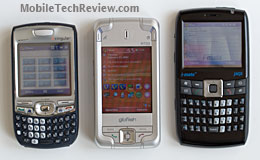
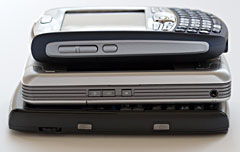
Size comparison: Treo 750, Glofiish M700 and the i-mate JAQ3. The X700 has 128 megs of flash ROM (standard for Windows Mobile Pocket PC phones) with 69 megs available to store files and additional programs. E-TEN's value added programs (installed at first boot) take up 18.51 megs of space, leaving 51 megs free (you can remove any of these programs if you wish). The phone has the standard 64 megs of RAM (used like RAM in your computer) with just under 32 megs free just after boot. For additional storage the M700 has a MicroSD card slot located on the device's bottom edge. The smartphone is compatible with cards up to 2 gigs in capacity. The M700 runs Windows Mobile 5, AKU 3.2 and the ROM version on our phone is WWE 052 0300.
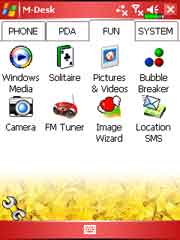
Display and Multimedia The M700 has a bright and sharp 2.8" color TFT display that can show 65k colors. The touch screen works in both portrait and landscape modes (screen rotation is a standard feature of Windows Mobile 2003SE and newer), and the smartphone comes with a telescoping stylus. You can adjust screen brightness using a slider and there are options to auto-adjust brightness relative to battery level and by idle time (if you're not using the device, it cuts back the brightness after 30 seconds). For sound the M700 has a rear-firing loud speaker than handles system sounds, music playback and the speakerphone. As with most PDAs, it won't thrill you, but it gets the job done. The speaker does distort at high volumes. Sound through the stereo 2.5mm headset jack is quite good using the included stereo earbud headset with mic. A mic gain applet lets you control recorded audio volume and there are no EQ settings built in for music and video playback. WiFi and Bluetooth The Glofiish M700 is a well connected device with WiFi 802.11b/g and Bluetooth 2.0 +EDR. The PDA sports E-TEN's usual wireless manager which allows you to control the phone, WiFi and Bluetooth radios. You can launch the manager by tapping its icon on the bottom of the today screen, or by launching it from M-Desk or the programs group. An x appears next to a radio that's turned off, and you can tap the ubiquitous E-TEN hammer to turn all radios on or off. You can't go directly from the Wireless Manager to the applets that control a given radio however, as you can on HTC devices like the Cingular 8525 and T-Mobile Dash. Instead you'll go to Programs and look inside the Utilities folder to find the Bluetooth Manager and WLAN Utility. E-TEN uses their own Bluetooth Manager and driver which feature a wizard interface to get you connected to Bluetooth headsets, your ActiveSync partner, or to transfer files over FTP/OBEX. The device supports headset, handsfree, A2DP and serial port profiles as well as vCard exchange. You can set discoverability, default headset and specify the FTP folder on the device. We tested the M700 with a variety of Bluetooth headsets including the Plantronics Discovery 655 and the scala-700 and it worked well. We tested A2DP stereo output (and AVRC playback control) using the Plantronics Pulsar 590 Bluetooth stereo headset which worked fine for system sound and stereo audio. During pairing with headsets (all used the standard 0000 passcode) we didn't have to enter the passcode on the M700-- we assume it auto-tries 0000 when pairing headsets to save you the trouble. The same is true of the X500 which uses the same software as well as Bluetooth and WiFi radios. In file transfer tests, speeds averaged 90k which is more like straight Bluetooth 2.0 non-EDR speeds but still better than 1.1 and 1.2 The WiFi manager, called WLAN Utility, gives you comprehensive information on your current connection and offers power saving and Tx rate settings. It's a nice addition over the basic Windows Mobile 5 networking control panel which provides very little connection information. Connection strength and reliability were good and on par with the Cingular 8525 and HTC TyTN. Camera 2 megapixels sounds good for a PDA phone, or even a regular US feature phone. As with the X500, there are plenty of pixels, but image quality isn't that great. Images suffer from excessive noise in indoor lighting and a general lack of color saturation in outdoor shots. Whites sometimes blow out for no apparent reason and color is sometimes off. The Glofiish M700's 2MP camera can't compare to the HTC TyTN /Cingular 8525's, and none compare to a good Nokia 2MP camera phone. Take note of our comments on the sample images below which were taken at the highest resolution and image quality settings with auto exposure and white balance.
The camera can take photos up to 1600 x 1200 resolution, as well as a variety of lesser resolutions including one suitable for MMS. Imaging software is the usual excellent and unique E-TEN offering. The camera app offers a wealth of settings, including white balance, special effects, timer and continuous shooting of photos (though the self-timer and continuous shot features were disabled on our production unit). The camera viewfinder takes up the entire screen and you can change between portrait and landscape orientation with the tap of a button.
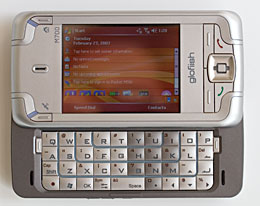
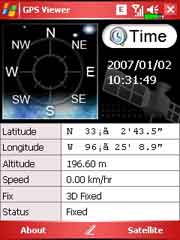
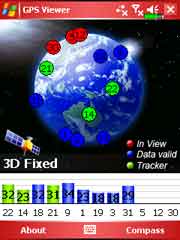
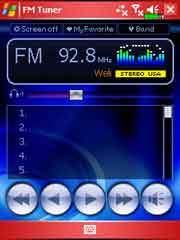
Battery Life There's plenty of juice to power the Glofiish thanks to a 1530 mAh Lithium Ion battery that's user replaceable. A phone with WiFi, Bluetooth and a GPS needs some serious power, so we're pleased to see that relatively high capacity standard battery. We moderate use we got more than two days on a charge, and that included talking on the phone 40 minutes per day, surfing via EDGE for 30 minutes, using WiFi for 30 minutes, accessing PIM apps, listening to MP3s with the screen off and more each day. If you're a push email addict or plan to use WiFi for a few hours each day, expect to charge nightly. The GPS is a significant power consumer, and if you wish to use it in car for trips of several hours, we suggest a car charger. E-TEN claims the device will last through 5 to 7 hours of GPS use, but that includes no other usage as a phone or PDA. The M700 has a battery meter on the top menu bar and an indicator on the Today Screen-- good going E-TEN, why doesn't Microsoft make this a standard feature? Conclusion If you're a fan of the HTC Wizard design Windows Mobile Pocket PC phones but want an internal GPS, the Glofiish M700 is a tempting choice. It ups the ante with WiFi 802.11b/g and Bluetooth 2.0 and a 2MP camera, putting it on par with the newer Hermes line (HTC TyTN et al), and lacks only the TyTN's 3G capabilities. Though somewhat plain and plasticy in appearance, the M700 is solidly constructed and the slider is snug with a reassuring snap into open and closed positions. WiFi performs well, Bluetooth is good, though profile selection is slim compared to some recent Pocket PC phones. The M700 is definitely one of those everything except the kitchen sink devices, and happily most of it works well. Pro: Fast performance, good battery life for a Pocket PC phone with quadruple wireless radios, very good keyboard, GPS is great at getting a fix even under adverse conditions. WiFi and Bluetooth will keep your device connected and the unlocked quad band world phone will keep you talking around the globe. As always, we really like E-TEN's custom suite of applications: they're very useful and stable. Con: Plasticy looks, occasional spelling errors in E-TEN software on the device, included basic GPS applet gets location wrong by more than 10 miles (at least in the US) though the GPS itself is accurate when used with popular mapping and navigation applications. FM radio station numbers are off (again, at least in the US). No 3G.
Price: Approximately US $640 Web site: www.glofiish.com (and www.etencorp.com)
| ||||||||||||||||||||