|
||||||||||||||||||
|
||||||||||||||||||
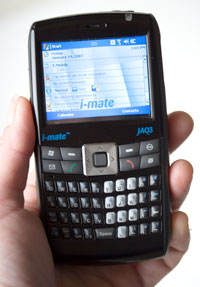
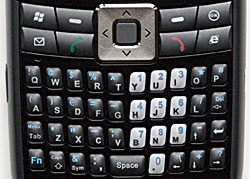
The JAQ3 has the right buttons to improve one-handed operation, though it can't compete with the Treo 750 on that front (nothing can, so far). Surrounding the d-pad you'll find Windows Start Menu and OK buttons, buttons for IE and e-mail (re-assignable) and the usual two Windows Mobile softkeys. The call send and end keys are adjacent to the d-pad which could be dangerous, but we didn't find ourselves accidentally hanging up when pressing right on the d-pad. The d-pad is large and easy to use and we like the big center action button. The buttons and keyboard keys are nicely domed and raised with good tactile feedback, so you won't need to stare at the device's controls when you should be looking at the road when driving.
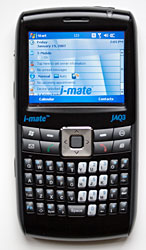
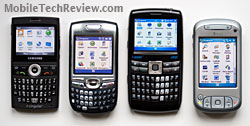
The keys are backlit (press a key and backlight stays on for approximately 5 seconds), and the embedded number keys are in light silver to contrast with the black number keys. When backlighting is on, the numbers, which are screened in mid blue, are hard to see, as are the blue Fn key-activated symbols. The keys have a somewhat rough texture which helps keep your fingers on the keys rather than sliding off (those with nails or sweaty hands will like this design). The phone's single LED lives above the screen and flashes green to indicate the phone is on the network and lights red to indicate it's charging. The very sharp 2.4" TFT color display looks small given the device's overall size, and it is small by standard 2.8" Pocket PC phone standards. The display is readable, in fact it's excellent. But those with less than youthful eyes may find it hard to read text that small.
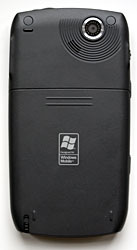
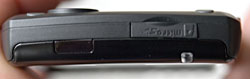
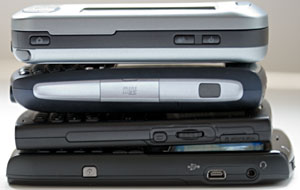
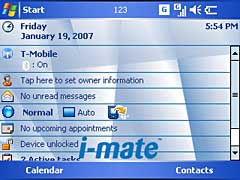
On the left side you'll find a scroll-wheel (pressing it in works as the action button, just like the center button on the d-pad), another "OK" button (not re-assignable) and the camera button. The inset power button (to avoid accidentally turning on the phone), standard mini USB sync combined sync and charge port and the 2.5mm stereo headset jack are on the right side. The MicroSD card slot and IR port are up top and the stylus slides into a silo on the phone's bottom edge. As you'd expect, the camera lens is on the back (there is no self-portrait mirror or flash), as is the speakerphone. The battery lives under a door on the phone's back and the SIM card slides into a slot located just above (and partially covered by) the battery. Phone Features, Data and Reception The JAQ3 is a GSM quad band phone that's sold unlocked for use with any GSM carrier in the world. It supports the 850/900/1800/1900MHz bands and has GPRS and EDGE for data. Unfortunately it doesn't have 3G for those of us in UMTS and HSDPA coverage areas. That said, in our DSL Reports mobile speed tests the JAQ3 manages a respectable 130k average on T-Mobile US' EDGE network and 145k on Cingular's EDGE network (proxy enabled). Like all Pocket PC phones, the i-mate comes with mobile versions of Internet Explorer and Outlook and you can install 3rd party Internet applications. Since the JAQ3 has Microsoft's AKU 3.2 update, it supports MS Direct Push email (MS Exchange Server 2003 SP2 required). Phone reception was middle of the road on T-Mobile's 1900MMHz network here in the Dallas metro area. Our phone is running the latest ROM (2.08) and it managed 3 bars while the T-Mobile Dash (king of RF on T-Mobile) got 4 bars and weaker phones such as the i-mate SPL and some low end Samsungs got 2 bars. Call quality is mediocre, and we wished for more clarity, less noise and fewer dropped sound bytes. Call recipients occasionally complained they could hear their own voices echoed back, perhaps because the mic is located a bit high and close to the speaker (it's just below the email button rather than being at the bottom of the phone). Horsepower and Performance Is speed your thing? Then turn the virtual page now. The JAQ3 is many things, but fast isn't one of them. The 200MHz Texas Instruments OMAP 850 processor running at 200MHz is a bit slow for a full-featured Pocket PC, and that same CPU was used in last year's T-Mobile MDA and Cingular 8125. The processor seemed a bit slow in those Pocket PC phones (especially since most of us where accustomed to 300 - 400MHz PPC processors) and it seems even slower in the JAQ3. We noted delays opening menus and windows and even scrolling through icons in the Programs group. The device is slow enough that we found ourselves trying to do the same thing several times, thinking we hadn't tapped the screen successfully the first time. In fact, tapping wasn't the issue, but rather than JAQ3 is pokey. If you're not a power user and don't crave very fast response times, you could make do with the JAQ3. It's not unusable by any means, but does require some patience. Given the slow CPU and performance, the JAQ3 isn't a good candidate for Skype, despite the built-in WiFi. We couldn't run our usual TCPMP video playback tests because the latest release version didn't work well on the JAQ3. Instead we eyeballed one of our 300kbps test WMV movies in Windows Media Player Mobile. The QVGA test flick is our lowest common denominator: it's got a fairly low bitrate, is QVGA and in a Windows Mobile friendly format. It plays decently on 200MHz smartphones and generally perfectly on Pocket PCs (even the 200MHz T-Mobile MDA). The JAQ3 didn't have a good time of it: frames dropped like crazy (it looked like 8-10 fps playback) and audio dropped in and out. The i-mate JAQ3 has the standard Windows Mobile servings of memory, with 64 megs of RAM (used like RAM in your computer) and 128 megs of flash ROM. Approximately 32 megs are available for your use to store programs and data, as i-mate's bundled applications use some available space in user-accessible flash memory. The JAQ3 has 22 megs of RAM free after a fresh boot. Should you need more storage space, you can get a MicroSD memory card for the phone's hot-swappable expansion slot. Bluetooth and WiFi The well-connected JAQ3 has both WiFi 802.11b/g and Bluetooth 1.2. You'll manage these using i-mate's Wireless Manager (accessible by tapping the strength meter on the Today Screen taskbar). WiFi supports the faster g standard and the device will connect to routers running in "g only" mode. Unfortunately, in our speed tests the JAQ3 got slow results when browsing over an 802.11g connection and DSL Reports speed tests showed an average of 340k which isn't as good as 3G and EVDO in many areas. In contrast, we get up to 1250kbit/s with the T-Mobile Dash and 1500kbit/s with the HTC TyTN over WiFi using the same router and speed test. I-mate includes a WLAN monitoring application that provides current connection information including SSID, channel, Tx rate, MAC address, signal strength and it allows you to set power savings as well as WiFi radio timeout. The JAQ3's Bluetooth 1.2 radio uses Microsoft's basic Bluetooth software and stack. It supports a wide range of profiles including A2DP (stereo audio), AVRC (AV Remote Control, using for controls on Bluetooth stereo headsets), hands-free, HID (keyboards and mice), BIP (printing over Bluetooth), SAP, serial port, object push, DUN and ActiveSync. Nice! We tested DUN and it worked well. Headsets were another matter, with relatively poor range with our selection of headsets including the Scala-700 and Samsung WEP200. Audio quality wasn't the best either with minor drops in audio and echo on the caller's end.
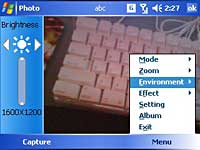
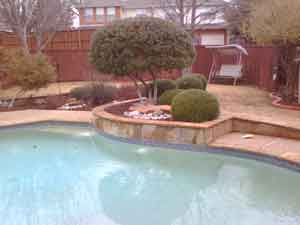
The sample photos above were taken at maximum resolution and quality settings, then sized down to fit this page. The outdoor cloudy scene is decent though lacking a bit of contrast (hey, this is a smartphone camera though). The indoor shot of Sammy the cat has a great deal of noise and a very strong purple cast. We took several similar indoor shots and some came out dark orange or even more heavily artifacted, telling us that the camera has trouble gauging light balance settings. We set the camera to night mode manually to get the best shot.
Battery Life The JAQ3 has a user-swappable 1250 mAh Lithium Ion battery. With a relatively small display, slow CPU and no 3G, the JAQ3 should run forever on a charge. Not quite... but it will last 1.5 days on a charge if you're not using push email, using WiFi for an hour or more or watching videos for hours at a time. Our estimates of average use and 1.5 days/charge are based on 40 minutes of phone calls, 45 minutes of surfing over EDGE, several PIM and MS Office document lookups per day and listening to MP3s for 30 minutes per day. Conclusion If you're hankering for a Pocket PC with a front facing keyboard and aren't a Cingular customer (or are allergic to the Treo and iPAQ square screens), the JAQ3 is worth a look. It's an attractive device with a very usable keyboard. Though the livin' large dimensions might throw your pocket for a loop (OK, it is thin). Unfortunately the stock phrase "Jack of all trades, master of none" comes to mind. The JAQ3 has a great feature set that looks great on paper, but doesn't execute as well as we'd like on several of those features: the device is slow, WiFi speeds are surprisingly low, Bluetooth (the older 1.2 standard) doesn't provide good audio with Bluetooth headsets and battery life could be better given the low CPU speed and lack of 3G. Pro: Yes, it's large, but the JAQ3 has a great form factor with a QVGA landscape touch screen display and a good keyboard. It's certainly thin at 0.57" and it feels good in the hand (if you have large hands). Great software bundle, nice case included. Screen is sharp and bright. Con: Call quality is just OK. The JAQ3 feels sluggish, thanks to the 200MHz TI OMAP CPU. A large device by today's standards, though it's attractive. The small screen isn't easy on the eyes and you must be more accurate with the stylus, though display quality and clarity are excellent. WiFi speeds are oddly slow. With several competing devices running Bluetooth 2.0, we're surprised the power-user JAQ3 has only Bluetooth 1.2. Poor range and noise with Bluetooth headsets. So-so camera.
Web site: www.clubimate.com Price: Estimated $550 to $600 Shopping: Where to Buy
| ||||||||||||||||||