|
||||||||||
|
||||||||||

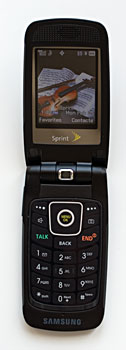
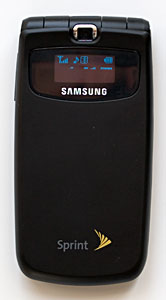
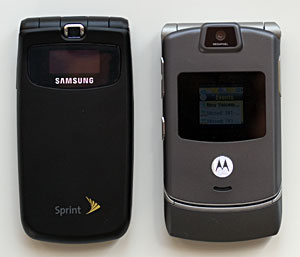
The Samsung M610 supports popular phone features including conference calling, call waiting, mute and speakerphone as well as Sprint services such as phone lock (for security) and roaming guard. It also has 98 speed dialing slots for you to fill from your Contacts database. The Contacts database allows you to enter up to 500 entries. Each entry can have 5 phone numbers and 1 email as well as an URL, a nickname, a memo note attached to it. You can also assign groups and unique ringtones to contacts. The M610 also comes with VoiceSignal’s Vsuite 2.1 voice recognition software. You can make calls by voice dialing using this software and give voice commands to send text messages, send email, lookup something, Go To an app or check time, battery life and more. Please note that you will still need to type the email and SMS messages after voice command launches the app and the contact. The maximum SMS characters allowed per message is 160, which is the industry standard. Like most recent Sprint feature phones, the Samsung M610 supports Sprint’s EV-DO high-speed data network which is called Power Vision in Sprint’s lingo. The M610 comes with the Eleca Obigo v1.17 browser that supports bookmarks, cookies, cache clear, Certificate Check and supports 128 bit SSL encryption. While the Samsung can’t run the DSL report mobile tests, web pages load speedily. For mobile optimized sites such as the Sprint’s Power Vision portal, the browser displays the pages perfectly and text pages flip quite fast. Pages that are not optimized for mobile phones will show up in a single column view in the browser. Even though the browser lacks advanced features such as Javascript support, the browser handled most non-mobile web sites we’ve tested. As the phone isn’t designed for heavy enterprise use, you will get only web-based email. Display, Gaming and Multimedia The Samsung M610 has a gorgeous looking TFT screen that’s color saturated and very bright. The 2.2” display has 240 x 320 resolution and is a just a hair longer than the MOTORAZR V3x’s screen. Photos and videos look clear and colorful on the screen. You can set the brightness to one of five brightness settings. At the brightest setting, the screen looks so bright that it almost feels uncomfortable if you stare at it for a long time. The outer display is in smaller size at 0.79” x 0.14” and can display 1 color (blue) on the OLED LCD. You will get the usual set of data on the outer display including incoming calls, missed calls, message alerts, battery life, signal strength and more. The Samsung M610 has 128 MB of ROM and 64 MB. The phone boots up very quickly and applications launch without any delays. Our review unit fresh out of the box had 58MB of memory available for storage. You can use the phone as storage to save contacts, images, games, themes, ringers screen savers, music videos and more. For expanded storage, you can use the MicroSD card option. Though Samsung recommends 512 MB cards, we tested the 1 GB Dane-Elec MicroSD card and it worked with the M610 just fine. The M610 supports ringtones in MIDI, QCP, MP3, AAC, AAC+, MP4, CMX (PMD file extension) formats and comes with Qualcomm’s Media Player that can play MP4 and m4a files. While music plays smoothly videos do not. You will experience frame skipping, image blocky-ness and out-of-sync audio in your video clips on the Samsung. Music playback via the included stereo headset and the loudspeaker is poor with tinny sound. But audio through Bluetooth stereo headset is much better. Perhaps the audio chip is fine but the speaker used on the M610 is causing the poor music quality. Java games play very well on the M610 without any delays and with perfect audio. We tested a wide array of games from Galaga and PacMan to Call of Duty 2 and Doom. Camera If you have an old 2-3 megapixel digital camera, you can leave it at home. The M610 has an excellent built-in 2 megapixel camera with 10x digital zoom. The camera has a CMOS sensor that takes great photos. It doesn’t have the auto-focus feature found on the Samsung a990 and the Nokia N73’s 3.2 megapixel cameras, but it takes great photos that look better than other 2 megapixel camera phones. The M610’s photos have a very natural tone without any noticeable color cast, and it deals great with low light indoor and outdoor shots with good light balance and brightness. The images have good contrast without seeming stark or monochromatic. The only hard thing for the camera to deal with is very bright sunlight, and that’s a challenge for many camera phones.
The camera takes JPG images at 1580 x 1124, 1280 x 960, 800 x 600, 640 x 480 and 320 x 240 resolutions. File sizes range from 100kb to 5kb per image. The camera utility will tell you how many photos you can still take based on available memory and allows you to set the white balance, brightness, metering options, color tone, image quality and more. The camera is capable of taking multi-shots and has self timer and self portrait modes. As with most camera phones, you can use the images taken with the phone’s camera as wallpaper, caller ID and MMS. The phone also comes with software that supports PictBridge which means you can print out the photos directly to a PictBridge compatible printer. The M610 camera can also take videos with audio in 3g2 format. You can set the video length to video mail mode which has a 30 second limit or max which is limited only by available memory either on your phone or storage card. Max mode recording is about 15 fps and 240 x 192 resolution. Bluetooth The Samsung M610 has integrated Bluetooth that supports Headset, Hands-Free, DUN (Dial-up Network), Basic Printing, Object Push (for vCards), File Transfer, A2DP and AVRC profiles. You can enable the Bluetooth radio and set visibility in Settings, but if you want to pair it with headsets, computers or printers, you will need to go to Tools. The Samsung paired with all headsets and car kit we threw at it with ease, though audio quality via the headsets isn’t that stellar. When using the Cardo Scala-700 Bluetooth headset, the Samsung sounded “underwater” with muffled audio and dropped syllables. The phone faired better on the Plantronics Discovery 655 without noticeable missing syllables and the sound is clear. But it still can’t compete with most other phones when working with the same headsets. Interestingly the Samsung M610 worked better with the Plantronics Pulsar 590A stereo Bluetooth headset via A2DP. The audio quality is better in general with much clearer sound. The range between the phone and the headsets are short also. Mono Bluetooth headsets got about 8-10 feet range and the stereo headset gets about 12-15 feet. The Samsung also supports AV remote control via Bluetooth. While it works well on music playback, the video playback lost its audio connection when using the Plantronics Pulsar. You can control the video playback however, just no audio pipes through.
The M610 also supports DUN which allows you to use the phone as a modem for your computer to access the Internet via the Bluetooth connection. The connection works very well with PCs, but doesn’t work with the Intel iMac with which we tested it. Data speed and file transfer speed are both quite fast, specially if you have a PC/notebook running Bluetooth 2.0. Keeping the Bluetooth radio on doesn’t have a big impact on battery life. Battery Life The Samsung M610 has a rechargeable standard Li-Ion battery that’s 800 mAh in capacity. That’s decent amount of battery if you mainly use the phone to make phone calls, send messages and listen to music. The talk time should run at about 3 hours with light use of other features. If you use Sprint’s Power Vision to watch videos, download music tracks and download games, it’s a good idea to get the 1300 mAh extended battery that’s sold as separate accessory. It took 1/3 of a full charge with the standard battery to download 5 video clips, 10 music tracks and 3 games and to play these downloaded content. Additional Software In addition to the Contacts database, the Samsung M610 comes with full set of PIM tools including Calendar, To do (Task List), Countdown, Voice Memo, Alarm Clock and World Time in Tools folder. The calendar has a monthly view which lists your schedules, birthdays etc. at the bottom of the calendar. You can set a maximum of 9 events a day and each event allows 32 characters. Remember this 9-32 number combo as it’s implemented throughout the PIM tools. You can have a maximum of 9 tasks, 9 countdown events, 9 memo notes and so on; and each of these entries can have 32 character with an exception in memo notes which allow up to 128 character. Voice memo allows 1 minute per recording. Sprint also bundled On Demand content by Handmark where you can get quick glance at the local weather, current news, stock and sports. The content is updated every time you load it. Conclusion If you are a Sprint customer looking for a thin, stylish flip phone with competitive feature sets, the Samsung M610 is a good contender. You will find a balanced feature set that will attract multimedia buffs and Power Vision addicts, and it won’t break the bank as the pricing is competitive with other mid to high-end feature phones. Pro: Stylish yet not flashy design that will turn heads. Very good 2 megapixel camera; if you are a camera phone fan you will like what you see with this camera. The EV-DO speed and web browser performs well on this phone. Multimedia download is fast compared to some competing Verizon feature phones. Rich set of PIM application and it’s very cool to have the On-Demand content bundled. Con: Audio quality leaves something to be desired. It affects both phone call quality and music playback quality. The video playback has some frame skips and blockiness. Bluetooth range is on the short side and the phone has trouble pairing with Mac. Price: $149.99 with 2 year contract on Sprint. $329.00 without a contract. Web sites: www.samsung.com www.sprint.com
| ||||||||||