|
||||||||||||
|
||||||||||||
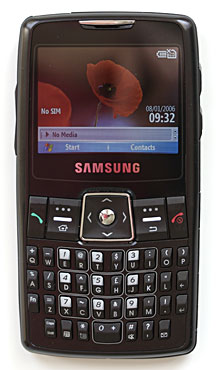
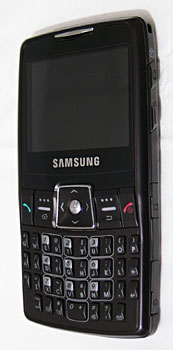
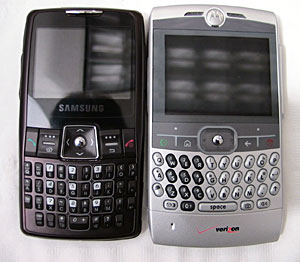
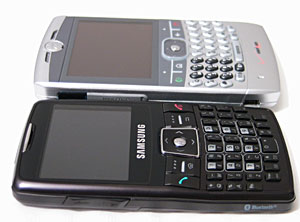
The keyboard goes beyond the Q a little by having its own backspace key so you don’t need to reach for the Windows Back key which feels a little odd by comparison.
The keyboard includes dedicated email and mute buttons but lacks a scroll-wheel or dedicated lock/unlock feature. The scroll-wheel feature found on the Q and the BlackBerry range of devices has found favor and some might see its absence as a problem. The same is true of the lock/unlock feature, being a candy-bar design, pocket-dialing is always a problem, a shrouded lock/unlock button goes a long way otherwise use of the device always includes the ‘press-and-hold’ to lock and ‘press two buttons’ to unlock regime. Phone Features and Reception This is a tri-band GSM phone with EDGE and Bluetooth. It supports the 900/1800 and 1900MHz frequencies. This puts it at a disadvantage in the US as it loses access to the 850Mhz band used by Cingular. I’m a T-Mobile subscriber and in my area 1900 is king so I’m ok; let’s see.
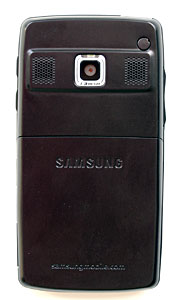
Interestingly, you have to manually change the band; I don’t mind this as it does mean that the phone never tries the other two bands when it loses the 1900Mhz signal, this should speed up re-acquisition. Call quality is fine; speaker phone mode is strong with the two rear speakers it’s loud enough for occasional use. To help the large of finger the phone dialer permits the number keys to use the neighboring keys to help reduce dialing errors. Horsepower and Performance The CPU is an Intel PXA 272 running at a solid 416Mhz; this is twice as fast as the current crop of Smartphones from HTC. It feels sporty in use. Typically, as with other Windows Mobile 5 devices it takes a moment to initially load an application but once in memory it’s quick to switch to when demanded. Oddly the ‘About’ screen refers to a ‘Intel PXA 27x’ and doesn’t disclose the speed. Usefully there is 128MB FLASH ROM on board for storage and 64MB RAM for running applications, again double the storage from the current crop. That suits the "I’m a Q killer" - load me up with applications theme, rather than I’m a SLVR, just a phone theory. In use there’s 95MB storage and 21MB of RAM available with a week of email and 500 contacts loaded up; no problem. Clearing down calls can sometimes appear frustratingly slow; odd given the rest of the spec. Let’s wait for an updated firmware to see if that’s hardware. The start and stop of calls are accompanied by an acoustic jingle from the speakers; perhaps that’s the cause of the delay? Another slight delay occurs when you’re typing into some of the text boxes; minor again but enough to notice; again, perhaps a future firmware update might address that. Expansion slots MicroSD is all that’ll fit. It goes in next to the battery. it’s a nice socket with a push in, push again to eject mechanism but it requires the battery to be removed which is annoying. If they’d turned it around it could have been inserted and ejected from the outside? Why why why? Data connections are over a propriety edge connector which is irritating as mini-USB might have fitted. More annoying is the cover that protects the connection; I feel that it might not last. Display, Gaming and Multimedia The landscape 320x240 display is top notch; crystal clear, high contrast and super-bright. The brightness is user configurable from ok to eye-popping. LED illumination makes best use of the power. The integrated Windows Media Player is great supporting DRM’d music and automatic synchronization to your PC. For video playback, TCPMP still edges out WMP for performance, easily managing 30fps on MPEG4 video. The keyboard is very positive and the five-way pad reliable in operation – good for gaming. Sound quality is good, plenty of dynamic range and good clarity. The supplied phones are ok I suppose but I recommend an upgrade for great audio. The Bluetooth stack supports high quality audio (A2DP) over Bluetooth so break out those wireless stereo headphones for best mobile effect.
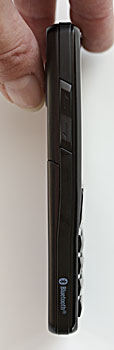
Bluetooth Bluetooth support is provided through the built in Windows Mobile tools, Bluetooth audio is there and pairing with all my test devices was a snap. Volume and clarity from the in-car setup I have was top-notch. DUN (dial up networkiing) works well using the phone's EDGE connection as a wireless modem for a PC over Bluetooth. It took only five minutes to setup the connection between the i320 and my laptop; and that yielded unlimited use from my T-Mobile $20/month service. Though 140Kbps is the speed limit you can’t beat the price. Battery Life The unit comes with two batteries (alarm bells ringing!) and carry case for the second battery (oh no!). Samsung tends to make fast performing Windows Mobile phones and include the extended battery to compensate for their shorter runtimes, as with the Samsung i730 and i600. The capacity isn’t marked on the battery, only ‘Standard Battery’, I’d guess about 800mAh given the size. Samsung claims 3 1/2 hours talk time, I don’t see a reason to doubt that; but that is on the slim side and heavy talkers will need to charge it daily. The claimed 140 hours standby seems a stretch, only attainable in a strong area with no email sync going on. The included extra battery can be charged outside of the unit with the included battery carry case that has a neat connector on the bottom to attach the charger. Software Samnsung have loaded up the i320 with a whole bunch of really useful stuff, there’s no Word/Excel/PowerPoint but there is Email, Calendar, Contacts and Tasks plus Windows Media Player, Internet Explorer and Pocket MSN; all standard fair but then they added a good camera application that supports video encoding at 320x240, a bundled document viewer from Picsel, a Voice Assist utility (that I could get to recognize me!) , a SIM manager, a useful units of measure converter, a world clock, a ‘D-Day’ tracker and a neat but simple Stopwatch. They also bundle their own home screen application and associated program launcher. It’s nice but doesn’t seem to add value over and above the regular OS menu’s. One notable omission is Microsoft Bubble Breaker… what am I to do? It was the only mobile game I played! Instead there is Samsung's "FunBox" which wraps the JAVA runtime and download as well as introducing a pure WAP browser to the platform. At first I thought the WAP browser existed to provide a true mobile phone browsing experience to existing mobile phone users but I realize after exploring FunBox that it’s really just there to aid in finding and downloading regular JAVA phone games from your carrier. I have an unlocked model with no carrier customization so no games for me. ActiveSync is here of course, it is the Microsoft application used to link the phone to the desktop. Physically it’s a USB connection. From the software you can browse your phone as a disk device and set up and configure synchronization. Sync of email, tasks, favorites, calendar and contacts can be completed with the included Outlook Client or your installed Microsoft Office. Email, Calendar, Contacts and tasks can be synchronized with a Microsoft Exchange server over the air. You can’t underestimate the value of synchronization, especially over-the-air; it’s great to get a new contact number, type it into your PC then, call it on your phone. Read emails on your phone, reply and forward; great stuff. The version of ActiveSync that ships with Windows Media 5 devices is now 4.1. Third-party software for the Microsoft Smartphone abounds and there are version optimized for the new OS features. It’s unlikely that an investment in Microsoft Smartphone would leave you wanting for any application. Check out http://www.pocketgear.com and www.handango.com. Conclusion The i320 is small, thin, light yet has an easy to use keyboard, a clear screen, plenty of memory, ample performance and a modest camera. It’s proof that you can have a qwerty keyboard on a regular mobile phone. How does it compare? Well, to a SLVR; it’s a candy-bar phone that beats it on everything but battery life, to a ‘Q’; it’s a viable, smaller, GSM alternative. I think it wins hands down and certainly wins my pocket. But what about the price? Ahh, there’s the crunch; right now you can pay $700 for the i320, shop around a little to reduce that but you run the risk of buying from sketchy suppliers. Look at it another way though, for the high entry price gets you an unlocked device that you can use on any GSM network that supports 900/1800/1900Mhz. I’m using T-Mobile in the US with an unlimited data plan for just $20/month. Contrast that with the low entry price of a Q on Verizon Wireless but with the high $79 monthly service, more if you want to use your Q as a data modem. Now the i320 starts to make sense. I recommend MadMonkeyBoy.com as a great supplier of unlocked phones in the US. Pro:
Cons:
| ||||||||||||